Database Management System (DBMS) Complete Guide - Notes, Concepts & Examples
By Chetan Sharma · · Updated · 6 min read
Database Management System (DBMS): Complete Study Guide
Introduction to Database Management Systems
Database Management Systems are the cornerstone of modern data-driven applications. From social media platforms storing billions of user profiles to banking systems managing financial transactions, DBMS technology enables organizations to store, retrieve, and manage vast amounts of data efficiently and securely.
Understanding DBMS is crucial for anyone pursuing careers in computer science, information technology, software engineering, or data analytics. Whether you're building a small web application or managing enterprise-level systems, knowledge of database concepts and management is essential for success in today's technology landscape.
What You'll Learn in This Guide:
- Database fundamentals and core concepts
- Different database models and their applications
- DBMS architecture and components
- Data independence and abstraction levels
- Practical SQL examples and queries
- Real-world use cases and best practices
Download Comprehensive Study Materials
Access detailed study materials including assignments, unit-wise notes, and practice questions prepared specifically for polytechnic DBMS courses:
📥 Download Assignment 1 - Database Fundamentals
📥 Download Assignment 2 - Data Models & Architecture
📥 Download Assignment 3 - Normalization & SQL Queries
📥 Download Unit 1 - Introduction to Databases
📥 Download Unit 2 - Database Models
📥 Download Unit 3 - SQL Fundamentals & Operations
📥 Download Unit 4 - Normalization & Database Design
📥 Download Unit 5 - Transactions & Concurrency Control
What is a Database and Its Purpose?
Understanding Databases
A database is an organized collection of structured, interrelated data stored electronically in a computer system. Think of it as a sophisticated digital filing system where information is stored systematically, making it easy to access, manage, update, and analyze.
Unlike simple file storage, databases provide structured organization with defined relationships between different pieces of information. This structure allows for efficient querying, updating, and maintaining data integrity across the entire system.
Real-World Database Examples:
-
Social Media Platforms: Facebook stores user profiles, posts, comments, likes, friendships, and messages for billions of users worldwide. The database manages complex relationships between users and content.
-
E-Commerce Systems: Amazon maintains massive databases of products, customer information, orders, inventory, reviews, and transaction history, processing millions of operations daily.
-
Banking Systems: Banks use databases to manage customer accounts, transactions, loans, credit cards, and ATM operations with high security and reliability requirements.
-
Educational Institutions: Schools and colleges store student records, grades, attendance, course information, faculty data, and academic schedules.
-
Healthcare: Hospitals maintain patient records, medical histories, prescriptions, appointment schedules, and billing information with strict privacy controls.
Why Do We Need Databases?
Traditional file-based systems have several critical limitations that databases solve:
1. Data Organization and Structure
- Databases structure information into tables with rows and columns
- Data is organized logically with clear relationships
- Easy to search, sort, filter, and analyze information
- Eliminates scattered files and folders
- Provides consistent data formats
2. Efficient Data Retrieval and Management
- Quick access to specific information using queries
- Handle massive datasets (terabytes or petabytes)
- Support millions of concurrent operations
- Optimized storage with indexing mechanisms
- Fast search capabilities even with billions of records
3. Data Security and Access Control
- User authentication (username/password)
- Authorization (who can access what)
- Role-based permissions (admin, editor, viewer)
- Data encryption for sensitive information
- Audit trails tracking all database activities
4. Data Backup and Recovery
- Automated regular backups
- Point-in-time recovery capabilities
- Protection against hardware failures
- Disaster recovery mechanisms
- Minimized downtime and data loss
5. Data Integrity and Consistency
- Enforce data validation rules
- Maintain accuracy across all records
- Prevent duplicate or invalid data
- Ensure relationships between tables remain valid
- Automatic constraint checking
6. Concurrent Access Support
- Multiple users access data simultaneously
- Transaction management prevents conflicts
- Locking mechanisms protect data integrity
- Supports thousands of concurrent users
- Maintains consistency during simultaneous operations
Characteristics, Advantages, and Disadvantages of DBMS
A Database Management System (DBMS) is sophisticated software that provides an interface between databases and users or applications. It handles all database operations including creation, querying, updating, security, backup, and administration.
Key Characteristics of DBMS
1. Data Abstraction
- DBMS hides complex physical storage details from users
- Users interact with simple, logical data representations
- Three abstraction levels: physical, logical, and view
- Simplifies database operations significantly
2. Data Independence
- Physical Independence: Modify storage structures without changing applications
- Logical Independence: Change logical schema without affecting applications
- Applications remain unaffected by database changes
- Provides flexibility for system evolution
3. Data Security and Integrity
- Enforces user authentication and authorization
- Implements access control policies
- Maintains data accuracy through constraints
- Prevents unauthorized access and modifications
4. Transaction Management
- ACID properties (Atomicity, Consistency, Isolation, Durability)
- All-or-nothing execution of operations
- Rollback capability on failures
- Ensures database remains consistent
5. Multiple Views
- Different users see customized data views
- Simplified data presentation based on needs
- Enhanced security through view restrictions
- Hides irrelevant data from users
Advantages of DBMS
1. Reduced Data Redundancy
- Each data item stored once
- Eliminates duplicate information
- Saves storage space significantly
- Reduces maintenance overhead
2. Improved Data Consistency
- Updates reflect across all references automatically
- No conflicting copies of data
- Maintains integrity continuously
- Reduces errors and inconsistencies
3. Enhanced Data Sharing
- Multiple users access data concurrently
- Facilitates team collaboration
- Real-time data availability
- Improves organizational efficiency
4. Better Data Security
- Centralized security management
- Fine-grained access control
- Encryption capabilities
- Compliance with regulations
5. Efficient Data Access
- Powerful query language (SQL)
- Indexed searching for speed
- Query optimization
- Fast retrieval with large datasets
Disadvantages of DBMS
1. Cost Considerations
- Expensive software licenses (Oracle, SQL Server)
- High-end hardware requirements
- Specialized training costs
- Ongoing maintenance expenses
2. Complexity
- Requires specialized knowledge
- Complex design and implementation
- Learning curve for administrators
- Sophisticated tuning needed
3. Performance Overhead
- Additional processing layer
- Slower than direct file access for simple operations
- Resource-intensive operations
- May not suit all applications
4. Single Point of Failure
- System-wide impact if DBMS fails
- Dependency on centralized system
- Requires high-availability solutions
- Need for redundancy mechanisms
Database Models - Choosing the Right Structure
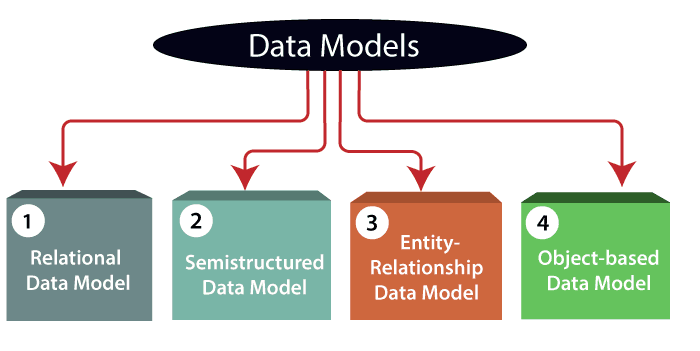
Database models define how data is structured, stored, and accessed. Understanding different models helps in choosing the right approach for specific applications.
1. Hierarchical Model
Organizes data in tree-like structures with parent-child relationships.
Characteristics:
- Each record has one parent, multiple children
- One-to-many relationships only
- Fast parent-to-child navigation
- Rigid structure
Use Cases:
- Windows Registry
- File systems (folders/files)
- Organizational charts
- XML documents
2. Network Model
Extensions of hierarchical model allowing complex graph structures.
Characteristics:
- Records can have multiple parents
- Supports many-to-many relationships
- More flexible than hierarchical
- Complex navigation
Use Cases:
- Telecommunications networks
- Transportation systems
- Course prerequisites
- Supply chain management
3. Relational Model (Most Popular)
Organizes data into tables with rows and columns.
Key Concepts:
- Tables (relations) store data
- Rows (tuples) are records
- Columns (attributes) are fields
- Primary keys uniquely identify rows
- Foreign keys link tables
Advantages:
- Simple, intuitive structure
- Powerful SQL queries
- Data independence
- Wide industry adoption
- Excellent tool support
Popular RDBMS:
- MySQL (web applications)
- PostgreSQL (advanced features)
- Oracle Database (enterprise)
- Microsoft SQL Server (Windows)
- SQLite (mobile/embedded)
4. Object-Oriented Model
Integrates database with object-oriented programming.
Features:
- Data stored as objects
- Supports inheritance
- Methods with data
- Complex data types
Use Cases:
- CAD/CAM systems
- Multimedia databases
- Geographic information systems
- Scientific applications
DBMS Architecture Levels - Data Abstraction
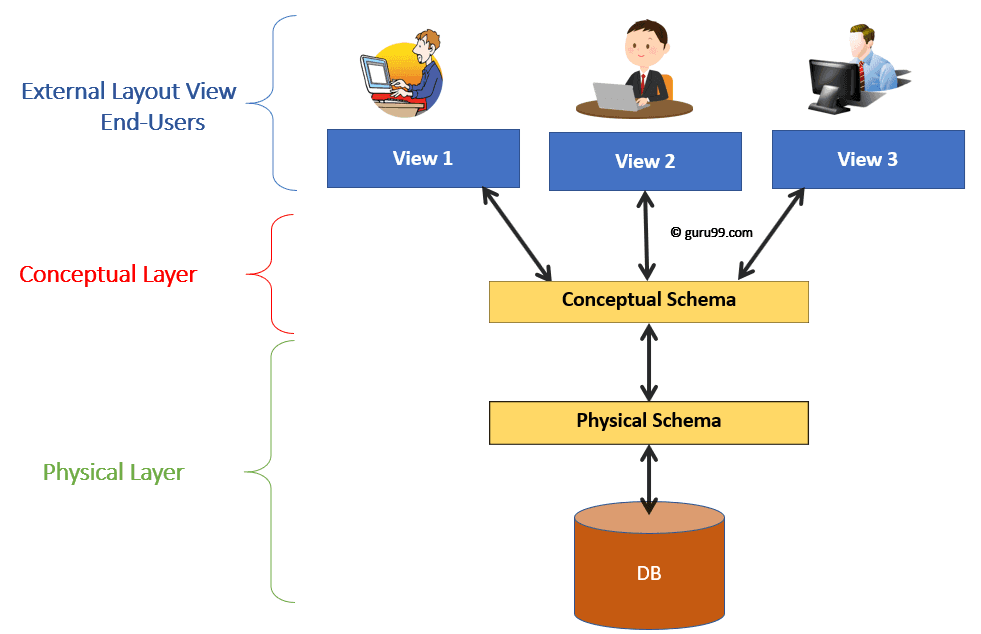
Important: Data abstraction allows data-program and data-operation independence, making databases flexible and maintainable.
Three-Level Architecture
1. Internal/Physical Level
- How data is physically stored on disk
- File organization and indexing
- Storage allocation and compression
- Managed by DBA and DBMS
2. Conceptual/Logical Level
- What data is stored
- Relationships between data
- Constraints and security
- Independent of physical storage
3. External/View Level
- How users see data
- Customized views per user
- Hides complexity
- Enhanced security
Actors in Database Systems
1. Database Administrator (DBA)
Responsibilities:
- Schema design and modification
- Performance tuning and optimization
- Security and access control
- Backup and recovery procedures
- User management
- Troubleshooting issues
2. Database Designers
Responsibilities:
- Create ER diagrams
- Define tables and relationships
- Normalize database structure
- Plan indexing strategies
- Document design decisions
3. End Users
Types:
- Naive users: Use applications, don't write SQL
- Casual users: Occasional SQL queries
- Sophisticated users: Complex queries, data analysis
- Specialized users: Domain-specific applications
4. Application Programmers
Responsibilities:
- Develop database applications
- Write efficient SQL queries
- Implement data validation
- Optimize database interactions
- Create APIs and interfaces
Workers Behind the Scene
These components work silently to ensure smooth database operations:
- Query Processor: Parses and optimizes SQL queries
- Storage Manager: Handles physical data storage
- Transaction Manager: Ensures ACID properties
- Buffer Manager: Manages memory caching
- Lock Manager: Controls concurrent access
- Recovery Manager: Handles failures and rollbacks
Summary and Key Takeaways
Database Management Systems are essential infrastructure for modern computing, providing:
✓ Efficient Data Management: Organize and access large datasets quickly ✓ Data Security: Protect sensitive information with access controls ✓ Data Integrity: Maintain accuracy and consistency automatically ✓ Concurrent Access: Support multiple users simultaneously ✓ Backup and Recovery: Protect against data loss ✓ Flexibility: Adapt to changing requirements easily
Understanding DBMS fundamentals prepares you for:
- Software development careers
- Database administration roles
- Data analytics and science
- System architecture design
- Enterprise application development
Continue exploring the downloadable materials above for deeper understanding of SQL, normalization, transaction management, and advanced DBMS concepts.
Next Steps:
- Practice SQL queries with sample databases
- Learn normalization techniques (1NF, 2NF, 3NF, BCNF)
- Understand transaction management and ACID properties
- Explore different DBMS products (MySQL, PostgreSQL, Oracle)
- Build simple database-driven applications
Thank you for using these study materials. For questions or clarifications, feel free to reach out through the contact page.
These comprehensive notes cover essential DBMS concepts for polytechnic and diploma students. Regular updates ensure alignment with current HSBTE syllabus and industry best practices.