Programming in C: Complete Study Guide
Introduction to C Programming
C is one of the most influential and widely-used programming languages in computer science and engineering. Created over 50 years ago, it remains fundamental for understanding computer architecture, operating systems, and embedded systems. Whether you're learning programming basics or preparing for professional software development, mastering C provides essential skills applicable across all programming domains.
Why Learn C?
- Foundation for understanding other languages (C++, Java, C#)
- Direct access to hardware and memory management
- Efficient code execution with minimal overhead
- Essential for embedded systems and kernel development
- Industry standard for system-level programming
- Develops strong problem-solving fundamentals
Career Applications:
- Operating system development (Linux, Unix)
- Embedded systems and IoT devices
- Firmware and device drivers
- Game engines and graphics programming
- Database systems and compilers
- Microcontroller programming (Arduino, ARM)
Download Comprehensive Study Materials
Access complete assignments and unit-wise notes for C programming:
What is C Programming?
Overview
C is a high-level, compiled, and well-structured programming language. It serves as the foundation for modern programming languages and is often called "the father of all modern programming languages" because virtually all contemporary languages (C++, Java, C#, JavaScript) are built on concepts introduced by C.
C provides:
- High-level abstraction: Easy-to-read syntax compared to assembly language
- Low-level access: Direct memory manipulation through pointers
- Efficiency: Produces fast, compact machine code
- Simplicity: Minimal set of keywords and straightforward structure
- Portability: Code runs across different platforms with minor changes
History of C
The Creation Story
A long time ago a man named Dennis Ritchie had an idea to develop a language in the early 1970s at Bell Laboratories. So, he created it and named C.
In professional terms:
The C programming language was developed by Dennis Ritchie in the early 1970s at Bell Labs (AT&T Bell Laboratories). It was initially created to develop the Unix operating system, which was originally written in assembly language. The need for a higher-level language led to C's creation.
Why C Was Needed:
- Assembly language was tedious and error-prone
- Previous high-level languages were too slow for system programming
- Required portability across different hardware platforms
- Needed language closest to hardware without assembly complexity
Key Milestones:
- 1969: Initial development by Dennis Ritchie
- 1972: First C compiler and early Unix implementation
- 1978: Publication of "The C Programming Language" by Kernighan & Ritchie (K&R) - the most influential programming book
- 1989: ANSI C standard established (C89/C90)
- 1999: C99 standard with additional features
- 2011: C11 standard with modern features
- 2017: C17 standard (current standard)
Evolution Impact:
- C became synonymous with Unix/Linux development
- Inspired design of all subsequent C-family languages
- Remains one of most popular languages decades later
- Powers most infrastructure software globally
Program Structure in C
Basic C Program Template
Every C program follows a standard structure. Let's examine a simple example:
#include <stdio.h>           // Header file - provides standard input/output

int main() {                  // Main function - program entry point
    // Prints "Hello, World!" to the console
    printf("Hello, World!\n");
    return 0;                 // Return 0 indicates successful execution
}
Understanding Each Component
1. #include Directive
#include <stdio.h>- Purpose: Include header file functions into your program
- Angle brackets < >: Search in system directories (standard library)
- Quotes " ": Search in current directory (custom headers)
- Common Headers:
stdio.h: Standard input/output (printf, scanf)stdlib.h: Memory allocation, random numbersstring.h: String manipulation functionsmath.h: Mathematical functionsctype.h: Character type checkingtime.h: Date and time functions
Example:
#include <stdio.h>     // System header
#include "myheader.h"  // Custom header
2. Main Function
int main() {
    // Program code here
    return 0;
}- Entry Point: Program execution starts here (mandatory)
- int Return Type: Returns integer status code
- Parentheses (): Parameters passed (empty by default)
- Braces {}: Enclose function body
- return 0: Indicates successful execution to operating system
3. Program Statements
printf("Hello, World!\n"); // Function call to print text- Function Call: Execute predefined function
- Semicolon ;: Terminates every statement
- String literal: Text in double quotes
- Escape sequence \n: Newline character
Phases of Program Development
Systematic Development Process
When developing a program, breaking it into logical phases makes work simpler, manageable, and understandable for any team member. The basic phases are:
Phase 1: Problem Definition
- Task: Clearly define what the program must do
- Activities:
- Understand user requirements completely
- Identify inputs and outputs
- Define program constraints
- Document expected behavior
- Create specification document
- Deliverable: Problem statement or specification document
Example:
Problem: Create a program that calculates the simple interest
Inputs: Principal (P), Rate (R), Time (T)
Formula: SI = (P * R * T) / 100
Output: Display calculated simple interest
Phase 2: Algorithm Design
- Task: Develop step-by-step procedure (algorithm) to solve the problem
- Activities:
- Break problem into smaller steps
- Define sequence of operations
- Handle special cases and errors
- Optimize for efficiency
- Deliverable: Detailed algorithm
Example Algorithm: Add Two Numbers
Step 1: Start
Step 2: Declare variables num1, num2, and sum
Step 3: Read (input) values for num1 and num2
Step 4: Add num1 and num2, store result in sum
         sum ← num1 + num2
Step 5: Display sum
Step 6: Stop
Algorithm Properties:
- Finiteness: Must terminate after finite steps
- Definiteness: Each step precisely defined
- Inputs: Accept zero or more inputs
- Outputs: Produce at least one output
- Effectiveness: Feasible with available resources
Phase 3: Flowchart Creation
- Task: Represent the algorithm using visual flowchart
- Benefits:
- Visualize program logic easily
- Identify errors before coding
- Communicate design to others
- Simplify complex logic
- Useful for documentation
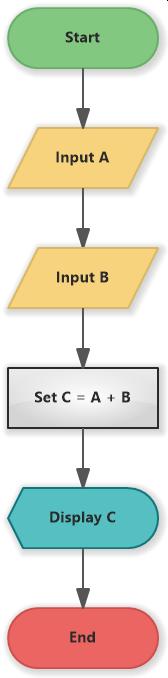
Flowchart Symbols:
Oval:        Start/Stop
Rectangle:   Process/Assignment
Diamond:     Decision (if/else)
Parallelogram: Input/Output
Arrow:       Flow direction
Phase 4: Program Writing (Coding)
- Task: Implement the algorithm in programming language (C)
- Activities:
- Translate algorithm to C syntax
- Follow coding standards
- Add comments for clarity
- Handle edge cases
- Use meaningful variable names
Example Code:
#include <stdio.h>

int main() {
    int num1, num2, sum;           // Declare variables

    printf("Enter first number: ");
    scanf("%d", &num1);             // Input first number

    printf("Enter second number: ");
    scanf("%d", &num2);             // Input second number

    sum = num1 + num2;              // Calculate sum

    printf("Sum = %d\n", sum);      // Display result

    return 0;
}
Phase 5: Compilation
- Task: Convert C program into machine code
- Process:
- Compiler checks for syntax errors
- Generates object code (.obj)
- Links with libraries
- Creates executable file (.exe)
- Output: Executable program ready to run
Process Flow:
Source Code (.c) → Compiler → Object Code → Linker → Executable (.exe)
    ↓
 (Check syntax, errors, warnings)
Phase 6: Testing and Debugging
- Task: Run program and verify correctness
- Activities:
- Test with various inputs
- Check for logical errors
- Verify output accuracy
- Test edge cases and boundary values
- Test error conditions
Testing Types:
- Unit Testing: Test individual functions
- Integration Testing: Test modules together
- System Testing: Test entire program
- Acceptance Testing: Verify against requirements
Phase 7: Program Delivery
- Task: Release to users/clients
- Activities:
- Create user documentation
- Prepare installation guides
- Provide training if needed
- Set up support system
- Monitor initial usage
Phase 8: Maintenance and Support
- Task: Update and fix issues post-deployment
- Activities:
- Fix reported bugs
- Implement requested features
- Optimize performance
- Update documentation
- Provide user support
Algorithm Development
What is an Algorithm?
An algorithm is a finite set of well-defined instructions used to solve a specific problem. It serves as a blueprint or plan for creating a program. Algorithms are language-independent and focus on logic rather than syntax.
Characteristics of Good Algorithm:
- Clear: Unambiguous instructions
- Finite: Terminates in finite steps
- Correct: Produces correct results
- Efficient: Minimal time and space
- Complete: Handles all cases
Algorithm Examples
Algorithm 1: Add Two Numbers
Step 1: Start
Step 2: Declare variables num1, num2, sum
Step 3: Read (input) values num1 and num2
Step 4: Add num1 and num2, assign to sum
        sum ← num1 + num2
Step 5: Display sum
Step 6: Stop
Algorithm 2: Find Maximum of Three Numbers
Step 1: Start
Step 2: Declare variables a, b, c, max
Step 3: Read values a, b, c
Step 4: If a > b then set max = a, else max = b
Step 5: If c > max then set max = c
Step 6: Display max
Step 7: Stop
Algorithm 3: Calculate Factorial
Step 1: Start
Step 2: Declare variable n, fact = 1, i = 1
Step 3: Read value n
Step 4: Repeat steps 5-6 while i <= n
Step 5:     fact = fact * i
Step 6:     i = i + 1
Step 7: Display fact
Step 8: Stop
Flowcharts
Visual Representation of Algorithm
A flowchart is a visual representation of an algorithm using standard symbols and flow lines. It shows the same logic as an algorithm but in graphical form, making it easier to understand program flow.
Advantages:
- Visual and easy to understand
- Helps identify errors early
- Good for communication
- Shows decision points clearly
- Useful for documentation
Flowchart Symbols and Meaning:
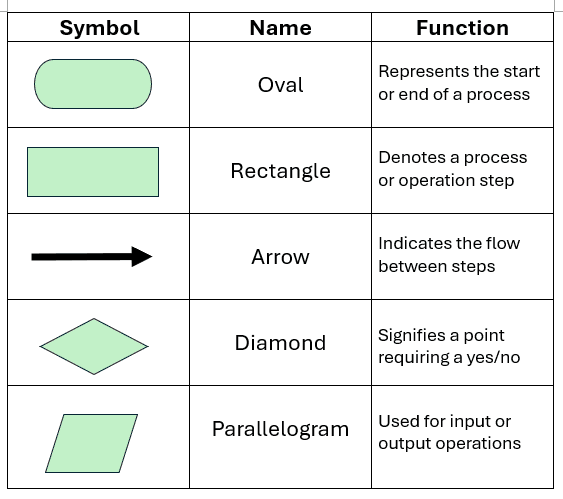
| Symbol | Name | Purpose |
|---|---|---|
| Oval | Terminal | Start or End of program |
| Rectangle | Process | Calculation or assignment |
| Diamond | Decision | Condition/if-else statement |
| Parallelogram | Input/Output | Read or write data |
| Rectangle with curved sides | Function | Call to function/subroutine |
| Arrow | Flow Line | Direction of execution |
| Circle | Connector | Connect parts of flowchart |
Example Flowchart: Add Two Numbers
      Start
        ↓
   Read num1
        ↓
   Read num2
        ↓
  sum = num1 + num2
        ↓
  Display sum
        ↓
       Stop
Program Debugging
Understanding Debugging
Program debugging is the process of identifying, locating, and fixing errors or bugs in a computer program. Debugging is a critical skill that separates novice from experienced programmers.
What is a Bug?
Obviously not an insect! A bug refers to errors that occur in the program. These errors can be of three main types:
1. Syntax Errors
- What: Violate C language grammar rules
- When: Detected during compilation
- Examples:
- Missing semicolon:
int x = 5 - Mismatched braces:
{code} - Wrong function name:
printff("text") - Missing header: No
#include <stdio.h> - Undeclared variable:
y = x + 5; // x never declared
- Missing semicolon:
- How to Fix: Compiler shows line number and error message
- Severity: Fatal - prevents program execution
Example:
// ERROR: Missing semicolon
int x = 5
printf("Value: %d\n", x);
2. Logical Errors
- What: Program runs but produces incorrect results
- When: Detected during testing/execution
- Examples:
- Wrong formula:
area = length + width;(should be multiply) - Wrong condition:
if (x > 10)(should be<) - Off-by-one error:
for(i = 0; i < 10; i++)processes 10 items (correct) - Wrong operator:
if (a && b)(should be||)
- Wrong formula:
- How to Fix: Trace code logic, use debugger, test extensively
- Severity: Critical - gives wrong answers
Example:
// LOGICAL ERROR: Formula wrong
float area = length + width;  // Should be length * width
3. Runtime Errors
- What: Program crashes or behaves unexpectedly during execution
- When: Detected during program execution
- Examples:
- Division by zero:
result = a / 0; - Array out of bounds:
arr[100]when size is 50 - Null pointer dereference:
*ptrwhenptr == NULL - Stack overflow: Infinite recursion
- Memory leak: Unused allocated memory
- Division by zero:
- How to Fix: Use debugging tools, add error checking, handle exceptions
- Severity: Critical - crashes program
Example:
// RUNTIME ERROR: Division by zero
int divisor = 0;
int result = 100 / divisor;  // Causes crash
Debugging Techniques
1. Code Walkthrough
- Manually trace program execution
- Follow variable values step by step
- Identify where values become incorrect
2. Debugging Tools
- gdb (GNU Debugger): Step through code
- IDE Debugger: Visual Studio, Code::Blocks built-in debugger
- Breakpoints: Pause at specific lines
- Watch variables: Monitor value changes
3. Testing Strategy
- Unit Testing: Test individual functions
- Boundary Testing: Test edge cases (min, max, zero)
- Error Testing: Test invalid inputs
- Stress Testing: Test with large data
4. Error Prevention
- Use meaningful variable names
- Add comments explaining logic
- Initialize variables before use
- Validate input data
- Use assertion statements
- Write simple, small functions
Summary and Important Points
Key Concepts Covered:
✓ C history and why it was created
✓ Program structure and components
✓ Eight phases of program development
✓ Algorithm design and representation
✓ Flowchart symbols and creation
✓ Three types of programming errors
✓ Debugging techniques and tools
Best Practices:
- Follow program development phases systematically
- Write clear algorithms before coding
- Create flowcharts for complex logic
- Write readable, well-commented code
- Test thoroughly before deployment
- Use proper variable names
- Initialize all variables
- Validate user input
Next Steps:
- Learn C data types and variables
- Master operators and expressions
- Understand control structures (if-else, loops)
- Practice writing small programs
- Build debugging skills with each program
These comprehensive notes cover essential C programming fundamentals crucial for polytechnic students and beginners. Regular practice with small programs will solidify your understanding of algorithms, flowcharts, and debugging for better problem-solving skills.
- Syntax Errors
Mistakes in the code's grammar or structure that prevent it from being understood by the compiler or interpreter.
- Runtime Errors
The error that is not visible at the compiling stage but occured in the running process are called runtime error.
- Logical Errors
Errors where the code runs without crashing but produces incorrect results due to flawed logic. Here’s a simplified explanation of input and output statements in C programming, following the style you've used in your notes:
Input and Output Statements in C
Input and output (I/O) statements are crucial for interacting with users in a C program. These are used to receive data from the user and display results back to them.
1. Output Statement
The output statement is used to display information to the user. In C, the most common output function is printf() which is stored in stdio.h file.
-
Syntax:
printf("format_string", variables); -
Example:
printf("Hello, World!\n");In this example,
printfprints "Hello, World!" to the console. The\nadds a new line after the message.
2. Input Statement
The input statement allows the program to accept data from the user. The most common function for input is scanf().
-
Syntax:
scanf("format_string", &variable); -
Example:
int num;
printf("Enter a number: ");
scanf("%d", &num);
In this example,
printfasks the user to enter a number, andscanfreads that number and stores it in the variablenum. The&symbol is used to pass the address of the variable toscanf.
3. Complete Example
Here’s a simple C program that combines input and output statements:
#include <stdio.h>

int main() {
    int num;

    // Output statement
    printf("Enter a number: ");

    // Input statement
    scanf("%d", &num);

    // Output the result
    printf("You entered: %d\n", num);

    return 0;
}
uuhhhh... lot of code, let's go through it for simple understanding.
- The program starts by including the standard input/output library with
#include <stdio.h>. - Then
mainfunction comes, Inmainfunction it declares an integer variablenum. - We used
printfto ask the user to enter a number. - Then
scanfto read the user input and store it innum. - Finally outputs the value entered by the user using another
printf.
 Note:
 Input: Use `scanf()` to get data from users.
 Output: Use `printf()` to display messages or results.
Constant
A constant refers to a value that can't be changed and remains same all the time. If we try to change the value it will through an error. For constant definition we use two keywords-
#define.const.
For better understanding let's chack an example-
#include <stdio.h>
#define PI 3.14

int main() {
   const int radius = 5;
    float area;
    area = PI * radius * radius;

    printf("Area of the circle: %.2f\n", area);
    return 0;
}
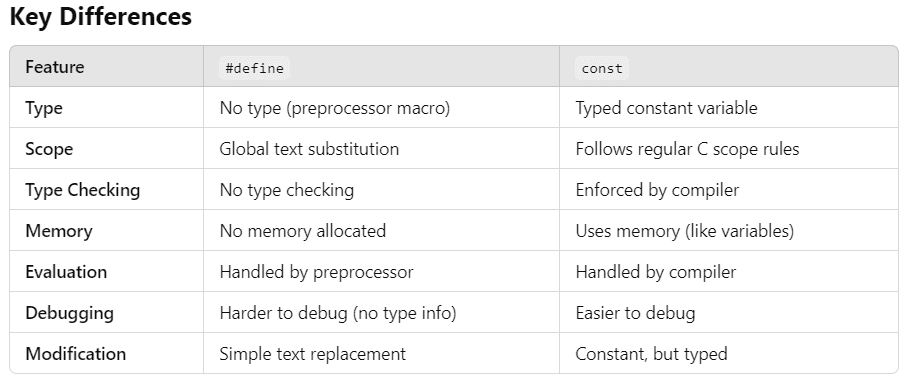
What's the difference?
#define is a preprocessor directive and the constant declared by this has a global scope. But the const is a reserved keyword and the constant declared by this has only local scope.
for key differences watch this 👉
Variables and Data types
Let’s learn about variables and data types in C Programming. We will first look at Variables in C, Variables are used to store the value during the execution of a program. The name itself means, the value of variable can be changed hence the name “Variable“. The variables are stored in Main Memory.
There are set of rules to be followed while declaring variables and data types in C Programming:
- The 1st letter should be alphabet.
- Variables can be combination of alphabets and digits.
- Underscore (_) is the only special character allowed.
- Variables can be written in both Uppercase and Lowercase or combination of both.
- Variables are Case Sensitive. i.e,
Nameandnameare considered different - No Spaces allowed between Characters.
- Variable name should not make use to the C Reserved Keywords.
- Variable name should not start with a number.
Syntax
#include <stdio.h>

void main()
{
    float f = 3.1415;
    printf("This is my float: %f \n", f);
}
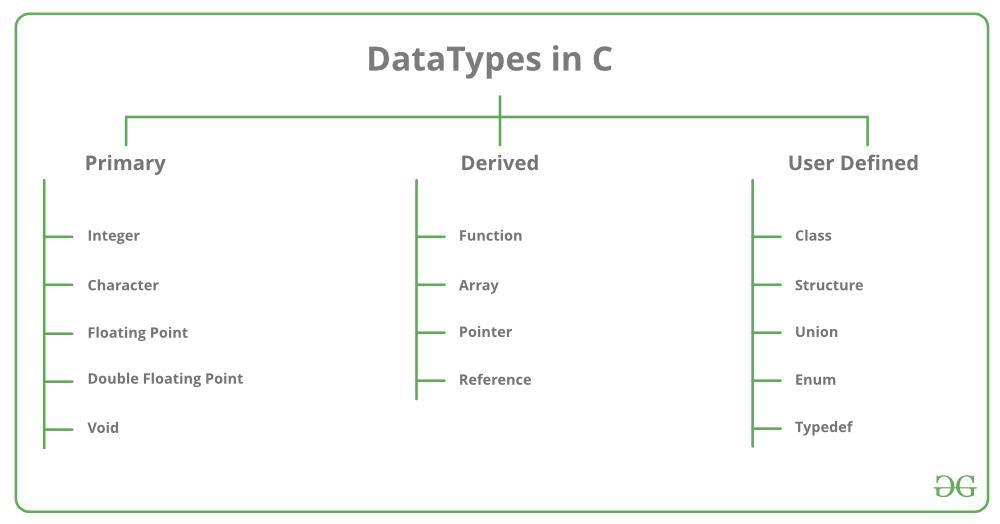
Before defining the variable we have to define it's data types.
Data types are-
Operators & Expressions
these are also precisely explained in the pdf, so check them and go ahead.
❔ Conditionals
conditionals allow you to execute code based on whether a condition is true or false. The most common conditional statements in C are:
- if Statement
- if-else Statement
- else-if Ladder
- switch Statement
- Ternary Operator (?:)
Let's go through each -
1. if Statement
The if statement is used to execute a block of code only if a specified condition is true.
Syntax:
if (condition) {
    // Code to execute if the condition is true
}
Example:
#include <stdio.h>

int main() {
    int number = 10;

    if (number > 5) {
        printf("Number is greater than 5\n");
    }

    return 0;
}
Explanation: If the value of number is greater than 5, the code inside the if block is executed. In this case, "Number is greater than 5" will be printed.
2. if-else Statement
The if-else statement is used when you want to execute one block of code if the condition is true and another block if it is false.
Syntax:
if (condition) {
    // Code to execute if the condition is true
} else {
    // Code to execute if the condition is false
}
Example:
#include <stdio.h>

int main() {
    int number = 3;

    if (number > 5) {
        printf("Number is greater than 5\n");
    } else {
        printf("Number is not greater than 5\n");
    }

    return 0;
}
Explanation: If number is greater than 5, the first block will run, otherwise the else block is executed.
- else-if Ladder
The else-if ladder allows you to check multiple conditions. If the first condition is false, it checks the next one, and so on.
Syntax:
if (condition1) {
    // Code to execute if condition1 is true
} else if (condition2) {
    // Code to execute if condition2 is true
} else {
    // Code to execute if none of the above conditions are true
}
Example:
#include <stdio.h>

int main() {
    int number = 0;

    if (number > 0) {
        printf("Number is positive\n");
    } else if (number < 0) {
        printf("Number is negative\n");
    } else {
        printf("Number is zero\n");
    }

    return 0;
}
Explanation: If number is greater than 0, the first block will execute. If number is less than 0, the second block will execute. If neither condition is true, the else block will print "Number is zero".
4. switch Statement
The switch statement is used when you have multiple cases to choose from based on the value of an expression. It's often used as an alternative to long else-if ladders.
Syntax:
switch (expression) {
    case constant1:
        // Code to execute if expression == constant1
        break;
    case constant2:
        // Code to execute if expression == constant2
        break;
    // Add more cases as needed
    default:
        // Code to execute if none of the above cases match
}
Example:
#include <stdio.h>

int main() {
    int day = 3;

    switch (day) {
        case 1:
            printf("Monday\n");
            break;
        case 2:
            printf("Tuesday\n");
            break;
        case 3:
            printf("Wednesday\n");
            break;
        default:
            printf("Invalid day\n");
    }

    return 0;
}
Explanation: The value of day is compared with each case. If it matches case 3, "Wednesday" is printed. If no case matches, the default block is executed.
5. Ternary Operator (?:)
The ternary operator is a shorthand for if-else statements. It takes three operands and is often used for simple conditional expressions.
Syntax:
condition ? expression_if_true : expression_if_false;Example:
#include <stdio.h>

int main() {
    int number = 4;
    const char *result;

    result = (number % 2 == 0) ? "Even" : "Odd";

    printf("Number is %s\n", result);

    return 0;
}
Explanation: If the number is divisible by 2, result is set to "Even". Otherwise, it’s set to "Odd".
6. switch Statement
The switch statement allows you to test the value of a variable against multiple cases. If a match is found, the corresponding block is executed. It's often used in place of long else-if ladders.
Syntax:
switch (expression) {
    case constant1:
        // Code to execute if expression == constant1
        break;
    case constant2:
        // Code to execute if expression == constant2
        break;
    // Additional cases
    default:
        // Code to execute if no cases match
}
Example:
#include <stdio.h>

int main() {
    int day = 2;

    switch (day) {
        case 1:
            printf("Monday\n");
            break;
        case 2:
            printf("Tuesday\n");
            break;
        case 3:
            printf("Wednesday\n");
            break;
        default:
            printf("Invalid day\n");
    }

    return 0;
}
Explanation: The value of day is checked against each case. In this case, it matches 2, so "Tuesday" is printed. If no cases match, the default case will run, but it's optional.
♾️ Loops
A loop is a statement in which a block of code run until the specified condition is true, If the condition is false then the code will not run. ther are many types of loops, some of the important are:
- while Loop
The while loop is used to repeatedly execute a block of code as long as a specified condition is true. The condition is checked before the loop body executes.
Syntax:
while (condition) {
    // Code to execute as long as the condition is true
}
Example:
#include <stdio.h>

int main() {
    int i = 1;

    while (i <= 5) {
        printf("i = %d\n", i);
        i++;
    }

    return 0;
}
Explanation: The loop runs while i <= 5. For each iteration, it prints the value of i and then increments it. The loop stops when i becomes 6 (condition is false).
- do-while Loop
The do-while loop is similar to the while loop, but the condition is checked after the loop body executes. This ensures that the loop runs at least once, even if the condition is false initially.
Syntax:
do {
    // Code to execute
} while (condition);
Example:
#include <stdio.h>

int main() {
    int i = 6;

    do {
        printf("i = %d\n", i);
        i++;
    } while (i <= 5);

    return 0;
}
Explanation: The loop runs once even though the condition i <= 5 is false. This is because the condition is checked after the loop body.
- for Loop
The for loop is used when you know in advance how many times you want to repeat a block of code. It consists of three parts: initialization, condition, and increment.
Syntax:
for (initialization; condition; increment) {
    // Code to execute
}
Example:
#include <stdio.h>

int main() {
    for (int i = 1; i <= 5; i++) {
        printf("i = %d\n", i);
    }

    return 0;
}
Explanation: int i = 1: Initialization step, where i is set to 1. i <= 5: Condition that checks if the loop should continue. i++: Increment step that increases i after each iteration. The loop will run 5 times, printing the value of i each time.
there are some statements used in loops are:
- break Statement
The break statement is used to exit a loop or a switch statement immediately, even if the condition hasn't been satisfied.
Example in a loop:
#include <stdio.h>

int main() {
    for (int i = 1; i <= 10; i++) {
        if (i == 5) {
            break; // Exit the loop when i equals 5
        }
        printf("i = %d\n", i);
    }

    return 0;
}
Explanation: The loop will terminate when i equals 5, because break forces the loop to exit.
- continue Statement
The continue statement is used to skip the current iteration and continue with the next iteration of the loop.
Example:
Copy code
#include <stdio.h>

int main() {
    for (int i = 1; i <= 5; i++) {
        if (i == 3) {
            continue; // Skip printing when i equals 3
        }
        printf("i = %d\n", i);
    }

    return 0;
}
Explanation: When i is 3, the continue statement skips the rest of the loop body and jumps to the next iteration, skipping the print statement for i = 3.
- goto Statement
The goto statement allows you to jump to a labeled section of code. It's rarely used because it can make code harder to understand, but it’s useful in certain cases like breaking out of nested loops.
Syntax:
goto label_name;

label_name:
// Code to jump to
Example:
#include <stdio.h>

int main() {
    int i = 1;

    loop_start:
    printf("i = %d\n", i);
    i++;

    if (i <= 5) {
        goto loop_start; // Jump back to loop_start label
    }

    return 0;
}
Explanation: The goto statement forces the program to jump back to the label loop_start, creating a manual loop.